Honest disclaimer up front: I built Nyx as a side project for fun. It started as an experiment to see if I could wire a bunch of security scanners together and make something useful out of the noise. It has since turned into a tool I genuinely use weekly(or when I change up my websites) — but it has limitations, known bugs, and rough edges. This is not a polished enterprise product. It is a personal project that works well enough for me to write about. Take it for what it is. Additional Disclaimer for my fellow Nerds : this post contains a ton of graphs!
Why This Exists
Security tooling has a dirty secret: it generates enormous amounts of noise, and almost none of it turns into action.
You install Semgrep. You add Trivy to your CI pipeline. You wire in Gitleaks so you stop accidentally committing API keys. Each tool does its job — they genuinely find real vulnerabilities. But what you end up with is four dashboards, three Slack channels full of alerts, a Jira backlog nobody owns or looks at, and a creeping sense that your "security posture" is mostly just theater.
I own a few CI/CD pipelines. One for this website, and another for my small business. I got tired of how much noise the scanners made and there was no unified dashboard for me to see all the scanner findings. I had to go into each scanner and review the file just to see what causes semgrep to yell at me, or Synk or Trivy to do the same. So I wanted to build something to handle that. Not professionally — personally.
I was running a handful of scanners across my own repos for fun (and my own learning benefit) and I couldn't keep up with the output. So I did what any reasonable person does: I made it worse by building another tool on top of them.
That tool is Nyx.
Named after the Greek goddess of night — the one who illuminates what others cannot see. It felt fitting. Also, I just liked the name.
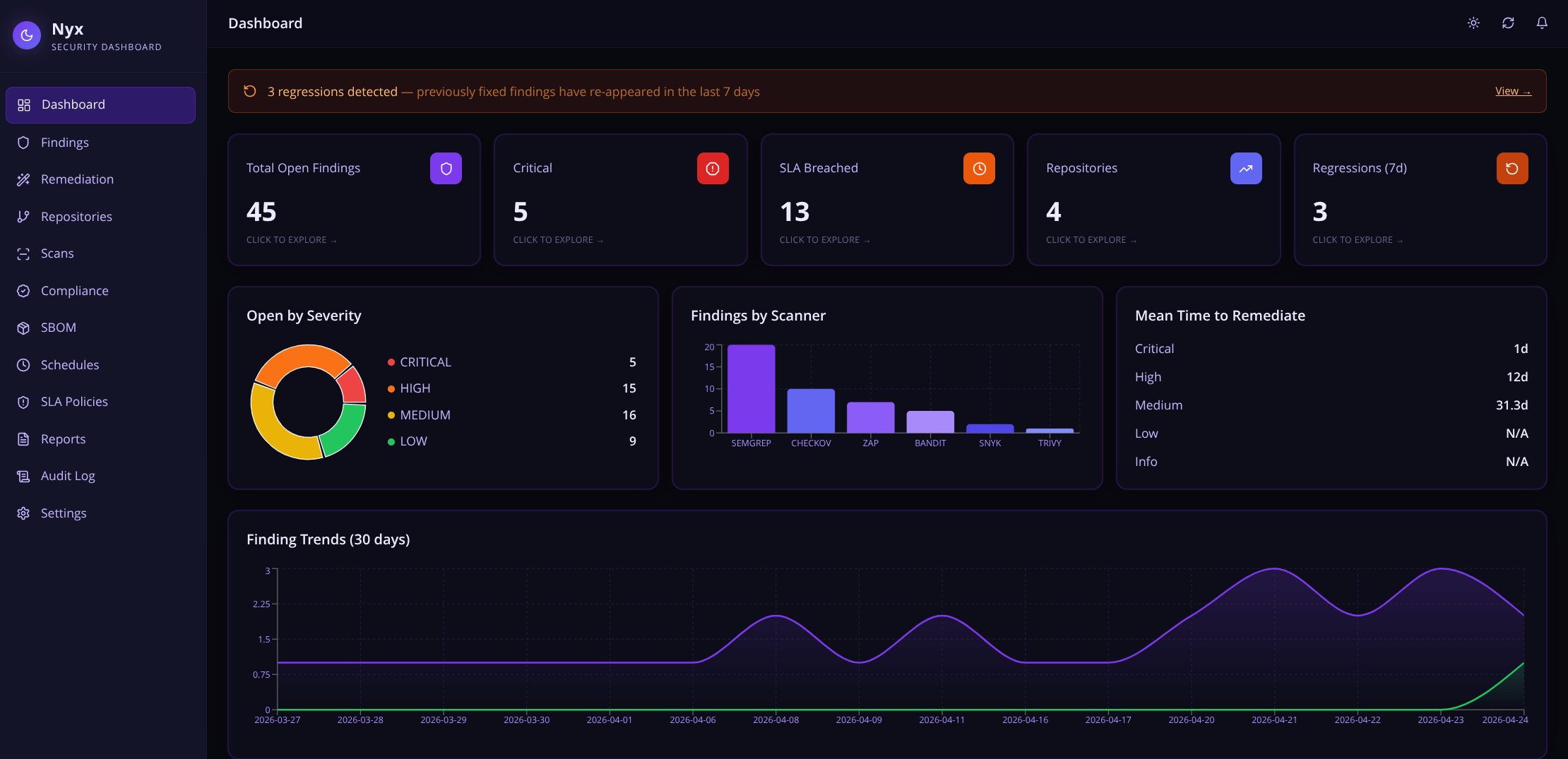
What Nyx Is
Nyx is a self-hosted security intelligence platform. It sits between your scanners and your workflow, doing several things that individually seem small but together make a real difference:
- Ingests findings from multiple scanners through a single API endpoint
- Deduplicates findings so if three scanners flag the same issue, you see it once
- Scores findings by real-world exploitability using CVSS, EPSS, age, and SLA proximity
- Tracks lifecycle from first detection through suppression, acceptance, or fix
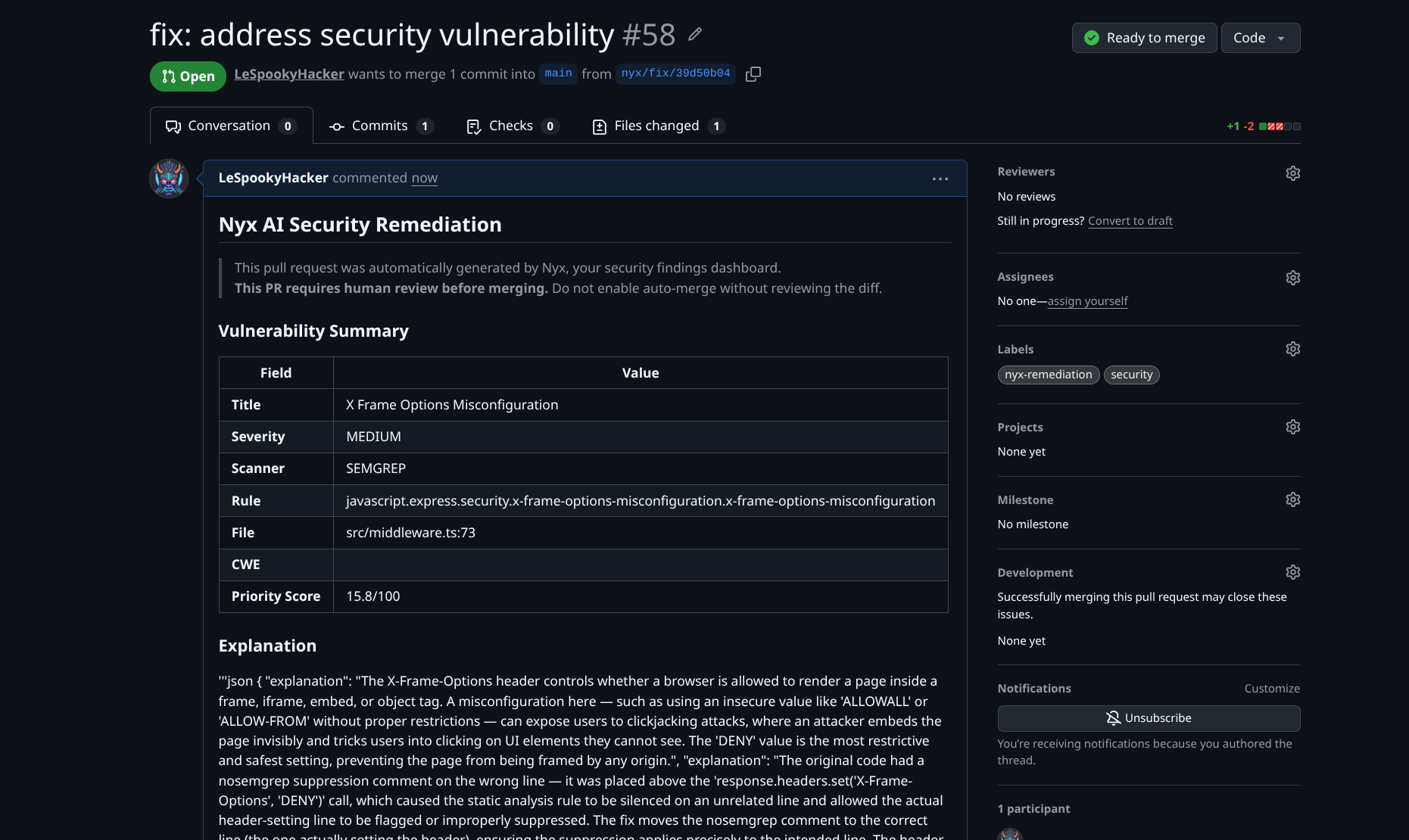
- Generates AI fixes using the Claude API and opens GitHub PRs automatically
- Learns from your decisions — suppression patterns are remembered and surfaced as hints on similar future findings - this feature is still a work in progress
- Maps findings to compliance frameworks so audits are less painful
- Maintains a full audit trail of every action taken in the system
- Detects which scanners your repo needs by inspecting its contents and recommending the right set
The goal is not to replace your scanners. They keep doing what they do. Nyx handles everything after the scan finishes.
How Nyx Runs
The Mission Statement
Security tooling should lower the cognitive load on the people responsible for security, not increase it. Every minute spent triaging duplicate alerts, manually tracking which findings have been looked at, or explaining the same vulnerability to the same auditor for the third time is a minute not spent actually fixing things.
Nyx exists to reduce that overhead. One place. One priority-ordered list. Clear ownership. Automated busywork.
That's it. That's the mission. I wanted to spend less time looking at scanner output and more time acting on it.
How It Works
The Full Data Flow
The Architecture
The Security Features
Multi-Scanner Ingestion and Normalization
Nyx supports eleven scanners out of the box:
| Scanner | Type | What it finds |
|---|---|---|
| Semgrep | SAST | Code-level vulnerabilities, anti-patterns |
| Bandit | SAST | Python-specific issues (SQL injection, hardcoded creds, etc.) |
| Trivy | SCA + Container | Dependency CVEs, OS package vulns, misconfigurations |
| Grype | Container | Container and filesystem vulnerability scanning |
| Snyk | SCA | Dependency vulnerabilities with fix guidance |
| OWASP ZAP | DAST | Runtime web application vulnerabilities |
| Gitleaks | Secrets | Hardcoded API keys, tokens, credentials in code |
| Hadolint | IaC | Dockerfile best practices and security issues |
| Checkov | IaC | Terraform, CloudFormation, Kubernetes misconfigurations |
| GitHub Code Scanning | SAST | GitHub's native code analysis alerts |
| Dependabot | SCA | GitHub's native dependency vulnerability alerts |
Every scanner produces output in a different format. Nyx has a normalizer layer with an adapter for each one that maps the raw output into a unified Finding schema. Add a new scanner? Add a normalizer class that extends AbstractNormalizer. That's it (theoretically).
Deduplication by Fingerprint
If Semgrep and Bandit both detect the same SQL injection in the same function, you see one finding — not two. Nyx deduplicates by a fingerprint composed of:
- Rule or CVE identifier
- Scanner name
- File path
- Line number (or URL for DAST)
- Repository
Cross-scanner overlap is collapsed automatically. This alone eliminates a significant chunk of alert fatigue in mixed-scanner setups.
Priority Scoring
Not all CRITICAL findings are equal. A CVE with a 0.97 EPSS score that has been sitting open for 60 days and is two days from SLA breach is categorically different from a fresh CRITICAL with no known exploit.
The Priority Score (0–100) accounts for all of this. It pulls live EPSS data from the EPSS API, weighs it against CVSS severity, finding age, and SLA deadline proximity, and produces a single number you can sort and filter on. The default findings view sorts by this score. Highest urgency floats to the top automatically.
SLA Policy Engine
Security without deadlines is just a wishlist. Nyx has a configurable SLA policy engine where you define per-severity, per-repository deadlines:
- CRITICAL: 7 days (default)
- HIGH: 30 days
- MEDIUM: 90 days
- LOW: 180 days
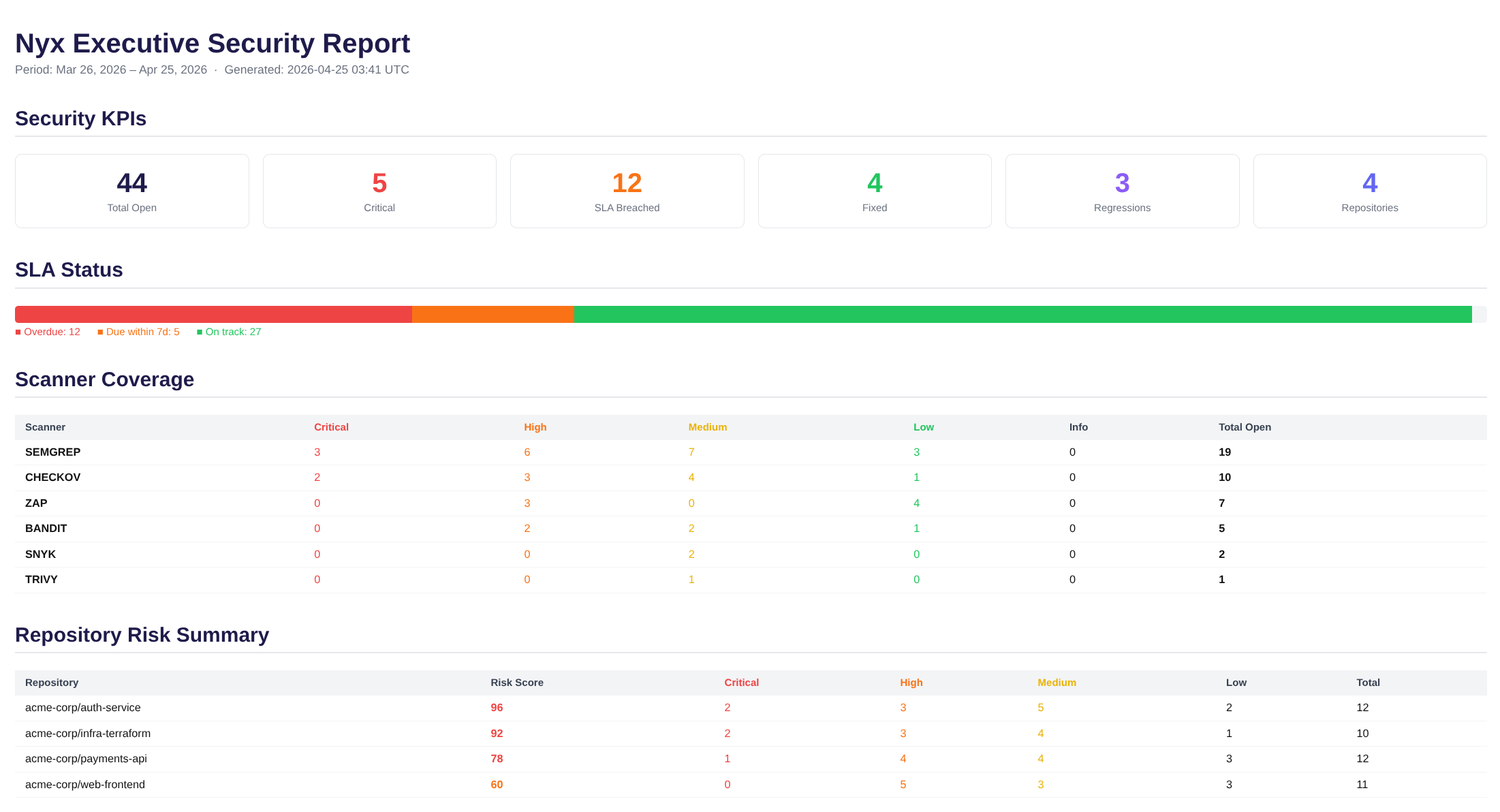
Every hour, a background worker scans all open findings. When a breach is detected it sends a webhook notification (compatible with Slack incoming webhooks, or any HTTP endpoint you point it at) and creates or updates a Jira ticket. The escalation action is configurable per policy — notify, create a Jira ticket, both, or neither. The executive report shows SLA status visually: how many findings are overdue, how many are approaching their deadline, how many are on track.
Regression Auto-Sort
This is one of the subtler features but one that became important fast when running Nyx against real repos.
When a finding is marked ACCEPTED_RISK or SUPPRESSED, an engineer has made a deliberate decision. They looked at it and said: we are not fixing this right now, here is why.
The problem is scanners keep running. The same finding reappears on the next scan, gets flagged as a regression, and lands back in the OPEN queue — requiring a human to re-make the exact same decision they already made. On a busy codebase, this happens dozens of times a week.
Nyx tracks the auto_close_status for every finding that a human has intentionally resolved. When that finding reappears in a subsequent scan:
No alert. No ticket. No engineer time wasted. Genuine regressions — things that were fixed and came back — still surface with the REGRESSION badge. The Auto-Sorted tab in the notification bell keeps a timestamped log of everything that was silently handled.
AI-Powered Fix Generation
In todays world of "AI this", and "AI that", I knew I wanted AI to be a thing in Nyx.
Security is often viewed by devs as a nuisance, I work with dev teams all the time that hate my guts. Focusing on automating findings, and shifting left was one of the core problems I wanted Nyx to solve. Security teams and dev teams should work together. AI-powered fixes seems like a step in the right direction but I knew going this route would require a ton of checks, and learning a bunch of new stuff.
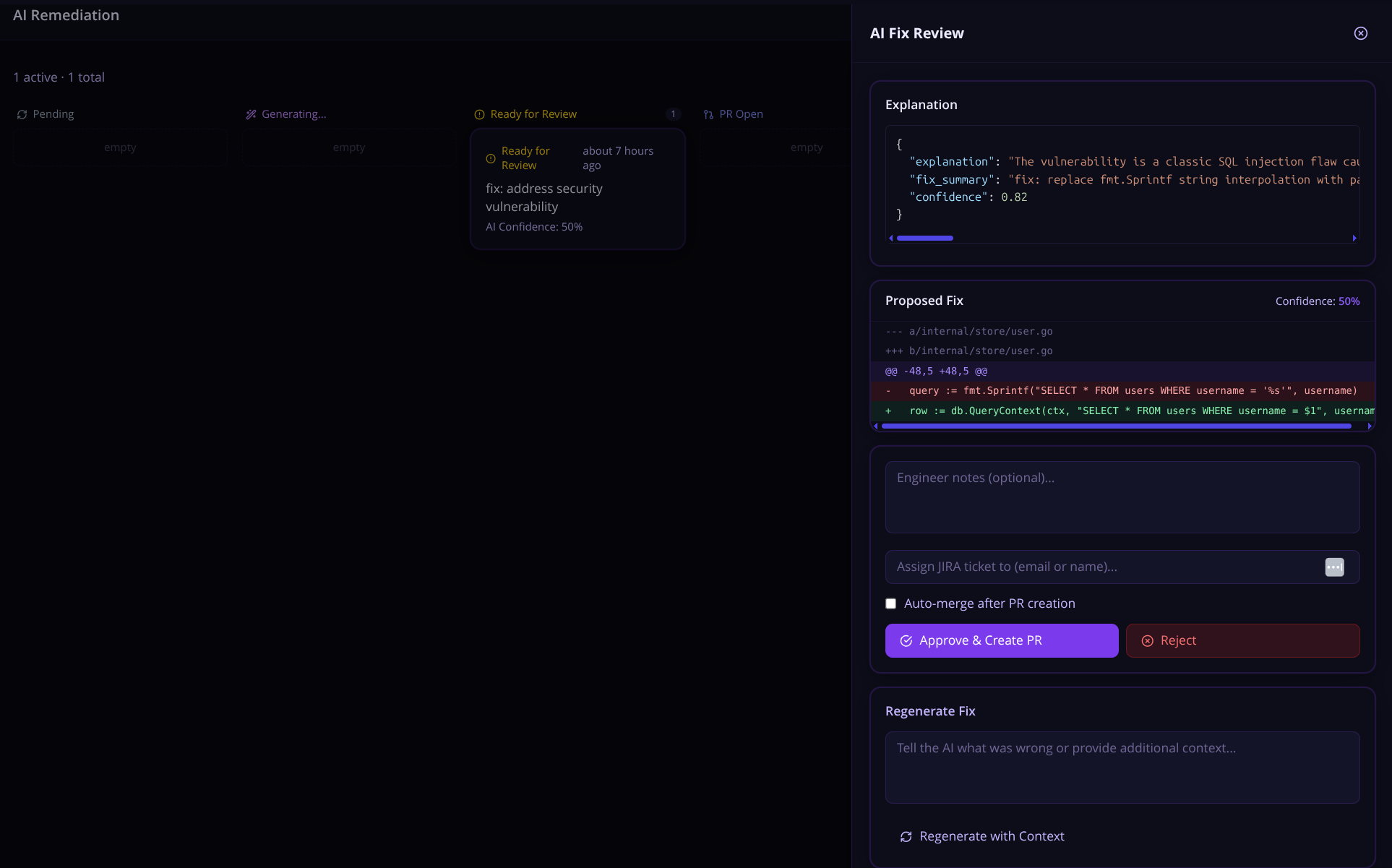
For any open finding, click Request AI Fix. Nyx sends the finding — the vulnerable code snippet, scanner description, CVSS context, CWE identifier, and file location — to Claude, which generates a targeted fix.
The engineer sees:
- A diff view of the proposed change
- An explanation of what was changed and why
- Suggestions for additional test coverage
You can also select up to 20 findings at once and bulk-request AI fixes — Nyx queues them all and generates fix PRs in a single action. Useful for knocking out a batch of similar findings (like a sweep of hardcoded credential removals or dependency bumps) without clicking through each one individually.
A few things Nyx does automatically to give Claude more context: it locates the test file for the affected source file (looking for test_foo.py, foo_test.py, tests/test_foo.py, and similar conventions) and includes it in the prompt. If the affected function already has tests, Claude can see them — which tends to produce fixes that slot into the existing test coverage rather than ones that break it.
If Claude's confidence for a fix falls below a configurable threshold, the fix gets a REVIEW_LOW_CONFIDENCE status rather than going straight to the engineer's approval queue. Low-confidence fixes still get generated and stored; they just do not get silently queued alongside the ones Claude is sure about.
There is also an Alternative Fixes endpoint. For complex issues where one obvious fix might not fit the codebase, you can ask Nyx to generate two or three independently reasoned approaches with trade-off analysis — letting the engineer choose rather than rubber-stamp the first thing Claude suggested.
For long-running fix generations, Nyx supports Server-Sent Events streaming — you can watch the fix generation progress in real time rather than polling for completion. This is a small quality-of-life thing but it makes the experience feel less like waiting for a spinner and more like watching Claude think.
The generated diff is scanned heuristically before storage — checking for things like os.system(), eval(), hardcoded secrets, or shell injection patterns showing up in the fix. If anything suspicious surfaces, it is flagged on the remediation record. This is not a guarantee, but it is a sanity check that something has not gone sideways in generation.
This is not a replacement for engineering judgment. Claude does not have full repository context. Some fixes need adjustment. But for common patterns — SQL injection parameterization, weak cipher replacements, dependency version bumps, hardcoded credential removal — the generated fix is often good enough to merge with a quick review.
A few integrity controls worth knowing about: when a diff is generated, Nyx stores a SHA-256 hash of it at review time. Before the PR is actually created on GitHub, it re-verifies the diff against that hash — so if something has been tampered with between the engineer approving it and the PR landing, the submission is rejected. Auto-merge (for setups where that is configured) is restricted to admin-scoped API keys only and will not proceed if the diff integrity check fails. The AI prompt itself keeps engineer-supplied context structurally separated from scanner data so injected content in one cannot bleed into the other.
The Claude Code Prompt Generator
This is different from the AI Fix flow and arguably more powerful for bulk remediation work.
Instead of having Nyx create a PR directly, you can select any set of findings and generate a Claude Code remediation prompt — a structured markdown block you copy and paste into a Claude Code session running locally with full filesystem access.
The generated prompt includes:
- Findings grouped by scanner category (SAST, SCA/dependencies, IaC, Secrets, DAST)
- Per-finding tables with severity, CVE/CWE, CVSS score, file path, code snippet, and remediation guidance
- Category-specific instructions (for secrets: rotate first, then remove from code; for SCA: update package manifest and lock file)
- A completion report template for Claude Code to fill in when done
Why Does This Exist?
Simple. In todays world, AI agents are coding a lot more than you think. I have seen tons of code snippets in my day to day that are written in some way by an AI chatbot or coding agent. Claude Code seems to be the most popular choice among the people I know so I figured lets build prompts that security engineers and devs can use.
Compliance Mapping
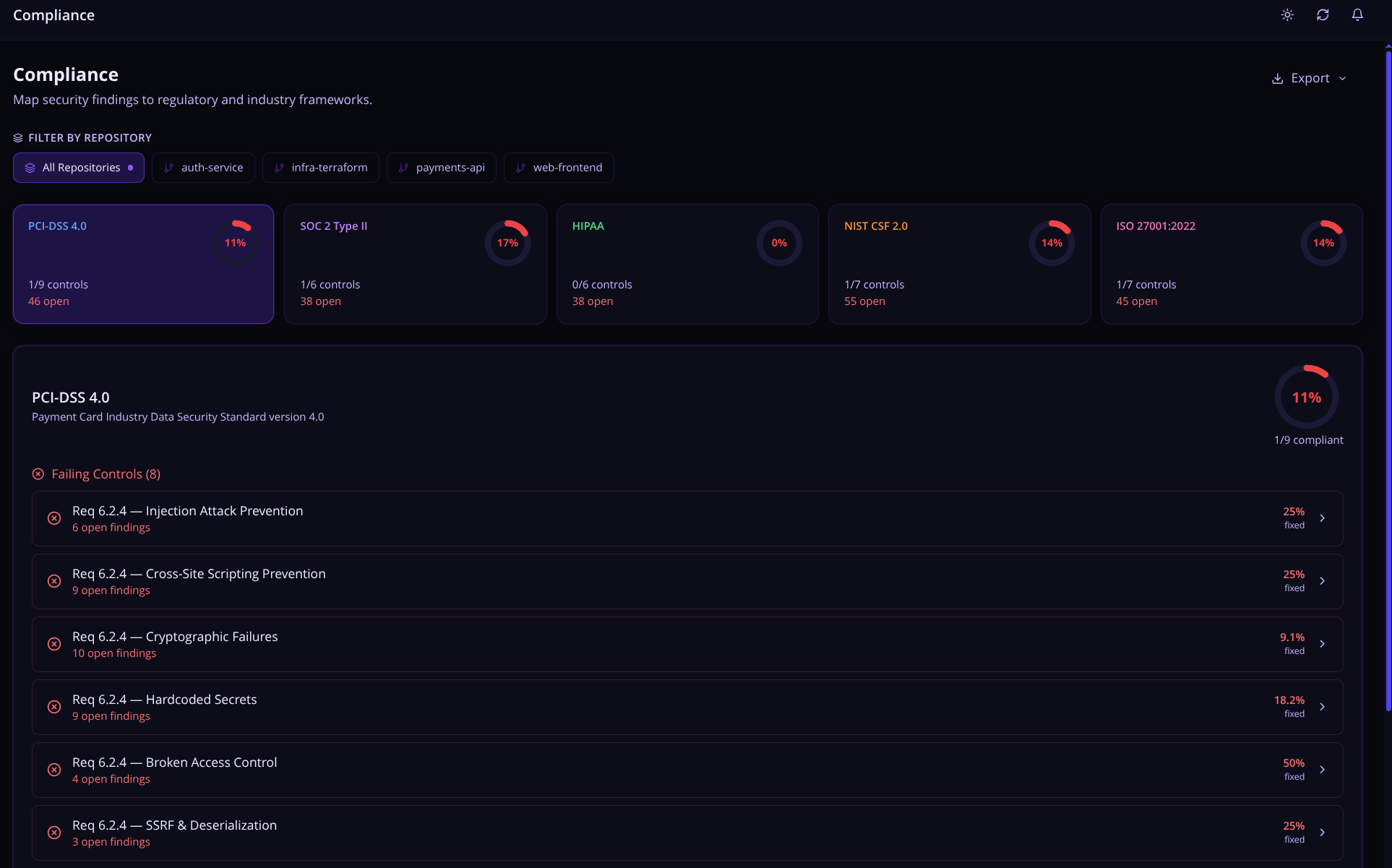
Nyx automatically maps findings to the compliance frameworks auditors care about:
- PCI DSS 4.0 — Payment card security requirements
- SOC 2 Type II — Trust Services Criteria
- HIPAA — Healthcare data privacy and security controls
- NIST CSF 2.0 — Cybersecurity Framework
- ISO 27001:2022 — Information security management
Each framework shows a compliance percentage gauge. Click into any control to see its CWE and OWASP mappings, a fixed vs. open breakdown, and the full list of open findings linked to that control across all repositories.
The Export button in the top right spits out the current view as either JSON (full structured report, useful for tooling) or CSV (flat columns: Framework, Repository Scope, Control ID, Title, Status, Open Findings, Total Findings, Coverage % — useful for auditors). When a repo filter is active, Export also offers an "all repositories" variant in both formats so you can hand over both scopes in one go. Filenames are descriptive, like compliance-pci-dss-my-repo-2026-04-19.csv.
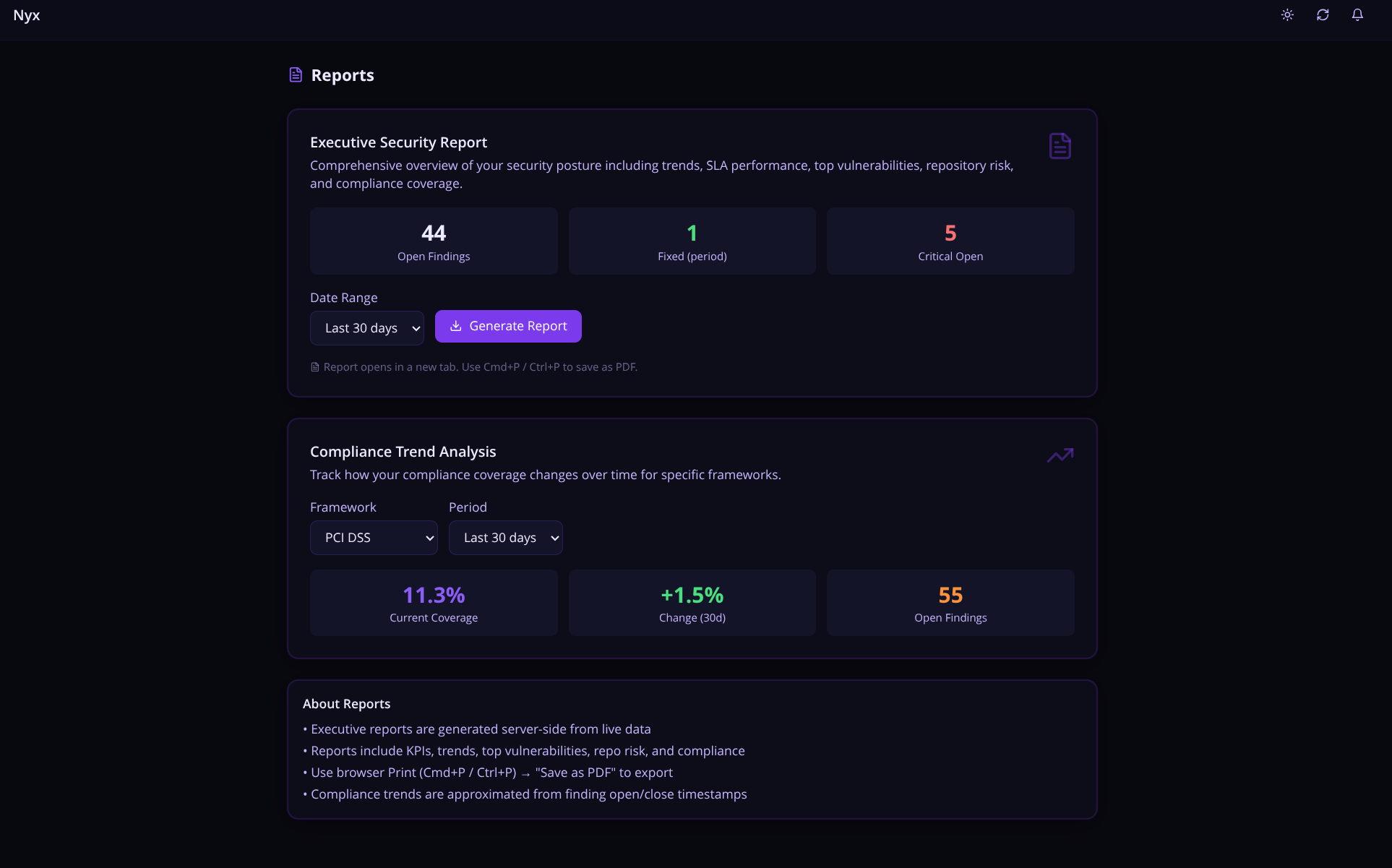
The Reports page includes a Compliance Trend view — weekly coverage percentage over 30, 60, or 90 days — which is the kind of chart that makes auditors happy.
If the built-in frameworks do not match your organization's actual compliance requirements, you can define your own. Custom frameworks live in the database alongside the built-ins, support CWE and OWASP category mappings on each control, and show up everywhere the built-in frameworks do — compliance gauges, reports, the lot.
Executive Security Report
Ever been asked to pull together a security update for leadership and spent an hour copy-pasting numbers into a slide deck? Nyx fixes that. The Executive Security Report lets you generate a clean, print-ready PDF in one click — no manual data wrangling, no spreadsheet gymnastics. It pulls live data from all your monitored repos and packages it into a full security snapshot: open and critical findings, SLA breach status, MTTR by severity, regression counts, weekly trend charts, a top-20 repo risk ranking, and a breakdown by scanner and vulnerability type.
It could definitely use some polishing but from a delivery standpoint, this is perfectly grabs your organizations security posture at a glance. Perfect for delivering updates to management.
Scan Schedules
You can configure recurring automated scans on a per-repository basis — anywhere from every 6 hours to once a week. A background worker checks every 5 minutes for schedules that are due and triggers the configured scanners via the GitHub Actions workflow.
This means you do not have to rely solely on push-triggered scans. If a new CVE drops on a Tuesday and nobody pushes code that week, the scheduled scan will still pick it up.
Audit Log
Every action in Nyx is recorded with a tamper-evident audit trail:
- Finding status changes (who changed what, when, and why)
- Suppression and acceptance decisions with documented reasoning
- AI fix requests and approvals
- Jira ticket creation and sync events
- Scan imports (which scanner, how many findings, timestamp)
- Workflow push events (who pushed to which repo)
- API key creation and revocation
One-Click Workflow Deployment
Onboarding a new repository takes under two minutes. From the Repositories page, click Push Workflow and Nyx pushes a canonical nyx-scan.yml directly to the repository via the GitHub API — no manual file creation, no YAML copy-pasting.
The deployed workflow runs all configured scanners, submits findings to Nyx, and generates an SBOM after each scan. It uses hashFiles() to auto-detect which scanners are relevant based on the files present in the repo — so if there is no Dockerfile, Hadolint is skipped automatically.
The Stack
The stack mostly came together organically by me googling how to do stuff. I had an idea for Nyx but a small developer understanding (I am a hacker by trade) on how to implement my vision. I leaned on Claude Code to help bridge that gap — using it to work through implementations I wasn't sure about, get unstuck on FastAPI patterns, and generally move faster than I would have on my own. I am very happy with the result.
- Backend: FastAPI (Python 3.11), async throughout, SQLite for dev / PostgreSQL for production, Alembic for migrations, asyncio for background workers
- Frontend: React 18, TypeScript, TailwindCSS (dark purple "goddess of night" theme), TanStack Query for server state, Recharts for visualization
- AI: Anthropic Claude (claude-sonnet-4-6) via the API for fix generation and prompt building
- GitHub: PyGithub for repo management, webhook handling, Check Run creation, PR filing
- Infrastructure: Docker Compose, native Docker restart policies (
restart: unless-stopped) for automatic container recovery, healthchecks on every container, rotating log files
The whole thing runs with docker compose up -d. Two containers. Under five minutes from clone to first scan.
What It Cannot Do (Honestly)
Here is the part of the blog post most tool announcements skip.
Known limitations:
- The AI fix generation does not have full repository context. It sees the vulnerable code snippet, surrounding lines, and the relevant test file if one can be found — not the whole codebase. Fixes for complex issues that require understanding cross-file dependencies will need adjustment. The alternative fixes feature helps here, but there is no substitute for an engineer who knows the codebase (yet).
- DAST scanning (ZAP) requires a running application to target. It does not work on static repositories without additional setup.
- The EPSS API fetch adds latency to scan processing. If the EPSS API is slow, your scan processing is slow.
- SQLite is for local dev only. In production mode, Nyx will refuse to start if a SQLite database URL is configured — set
DATABASE_URLto a PostgreSQL connection string before running withENVIRONMENT=production. But if you running it to test it out, SQLite is perfect. - The test coverage is not where I want it. There are integration paths I have not fully tested against all scanner output variations in the wild.
- Some UI flows have rough edges. I fix them as I find them.
- There is no multi-tenancy. Nyx is designed for a single organization or personal use. It does have role-based API key scopes (
scanner,readonly,analyst,admin), so you can limit what different services and users can touch — but it is not a multi-org SaaS platform.
Known bugs:
There are bugs. I use this thing weekly and I still trip over them. I fix what I find and I keep a running list. If you run into something, I genuinely want to know about it.
This is a personal project that got more serious than I intended. That is a good thing. But it means it carries the marks of something built iteratively by one person with opinions — not a product that went through a formal QA process.
Who Built This (and Why That Matters)
I should probably mention: I am not a software developer by trade. I am a hacker. I have been in the infosec field for over ten years — security is what I do professionally and what I think about constantly. I read code, I identify the holes, and I exploit them. But writing production software? That is not my background. I have always been on the breaking side, not the building side.
As I mentioned earlier I relied on Claude Code to bridge that developer gap. It was a genuine help here — I used it here and there while building Nyx when my dev knowledge ran thin. This allowed me to focus more on the security logic (the part I actually know) and lean on it for the implementation details I was learning as I went. Keep in mind that this isn't a vibe coded app, I made sure it was securely configured and developed. I have been through several code sprints in the last three months on this project. It was probably one of the most fun side projects I have undertaken in quite some time.
Nyx started as a way to see if I could cross that line — the breaker to builder line. To take the problems I actually deal with in my security work and build a real tool to solve them. It took nearly 3 months to get to this point, to the point where I felt comfortable enough to post it online and blog about it. But at its core Nyx is a passion project, a learning exercise, and honestly a resume piece all rolled into one.
There are almost certainly weird implementations, architectural choices a senior engineer would side-eye, and bugs I have not found yet. That is the deal. If you are here for enterprise-grade polish, this is not it. If you are here for a tool built by someone who knows the security problem inside and out and taught themselves to code the solution — stick around.
Why I Keep Working on It
Honestly? Because it works well enough that I reach for it when I need to understand the security posture of something I am running. That was not the plan. The plan was to mess around with scanners, and build a centralized container for all the scans so I can easily look at it. All the while learning FastAPI and Claude's API and see what happened.
What happened was I built something that replaced four tabs of scanner dashboards with one coherent view, automatically handles 80% of the lifecycle busywork, and lets me focus on the 20% that actually requires human judgment.
That felt worth writing about and keep working on.
Try It
Nyx is self-hosted and open source. If you want to run it:
1git clone2cd nyx3./setup.sh
setup.sh is a first-run wizard that walks through the prerequisites, generates secrets for you, prompts for your GitHub token and Anthropic API key, validates them against the real APIs before writing anything, and then starts Nyx. If you prefer to manage the .env file yourself, the manual path is still there — cp .env.example .env, fill in the keys, ./nyx.sh.
Once it is running, ./nyx.sh check probes all integrations (database, Anthropic, GitHub, JIRA, notification webhook) and reports back per-integration status without starting or restarting anything. Useful to run after a config change or before deploying to a new environment. There is also ./nyx.sh doctor for an end-to-end canary — health, auth, integrations, and a round-trip scan import in one command — which is what I reach for first when something is not working.
Read the wiki docs for the full setup guide. It covers Docker Compose configuration, GitHub App setup, the scanner workflow deployment, the PostgreSQL Compose override, and the API key management UI.
If you try it out and hit bugs, have feedback, or want to tell me about something that does not work the way you expected — email me: wanderersgrimoire@gmail.com
I am genuinely interested in how other people use it, what their scanner setups look like, and what Nyx is missing from their workflow. It started as a fun project. It has stayed fun. That is probably the best thing I can say about it.
Nyx is an independent personal project. It is not affiliated with Anthropic, GitHub, Snyk, or any of the scanner projects it integrates with. Nyx is licensed under the MIT license, please credit me if you will be using it outside of testing purposes.
Built by Le Spooky Hacker
Topics Not Covered in This Post
- Velocity Analytics
- AI Cost Tracking
- JIRA integration
- False Positive Learning
- SBOM generation
- Visibility features
- Notification systems
- Platform Security
- And many more!
Please see the official wiki docs for more information. Please note, the wiki docs may have some inaccuracies in that I do not update them as often as I should.
Glossary of Acronyms
- AI — Artificial Intelligence
- API — Application Programming Interface
- CVSS — Common Vulnerability Scoring System
- CVE — Common Vulnerabilities and Exposures
- CWE — Common Weakness Enumeration
- DAST — Dynamic Application Security Testing
- EPSS — Exploit Prediction Scoring System
- IaC — Infrastructure as Code
- MTTR — Mean Time to Remediation
- NIST CSF — National Institute of Standards and Technology Cybersecurity Framework
- OWASP — Open Web Application Security Project
- PCI DSS — Payment Card Industry Data Security Standard
- PR — Pull Request
- QA — Quality Assurance
- SAST — Static Application Security Testing
- SCA — Software Composition Analysis
- SBOM — Software Bill of Materials
- SHA — Secure Hash Algorithm
- SLA — Service Level Agreement
- SOC 2 — System and Organization Controls 2
- SQL — Structured Query Language
- SSE — Server-Sent Events
- HIPAA — Health Insurance Portability and Accountability Act
- ISO — International Organization for Standardization
- YAML — YAML Ain't Markup Language
Join the Grimoire
Get notified when I publish new posts. No spam, unsubscribe anytime.